The first thing we do with a new client is rarely the ad campaign. It's the CRM.
With Hot Springs Pools & Spas, that meant building HubSpot into the central system that tracks every lead and every deal across four locations. We brought it in this year, and it's already a live account with over 17,000 contacts, two active sales pipelines, and a direct line from every marketing channel and every phone call into a record HubSpot can actually use. Here's what's actually in it.
Key takeaways
The CRM comes before the ad campaign: every lead, call and deal lands in one system from month one.
Lifecycle stages separate a form fill from a real buyer, and qualified stages feed back into Google Ads bidding.
Every channel gets its own tracked line, written straight onto the contact record.
We start on HubSpot's free tools and push them as far as they go before recommending a paid tier.
Lifecycle Stages, and How They Sharpen Google Ads Targeting
Every contact in Hot Springs' HubSpot sits in one of four lifecycle stages: Lead, Sales Qualified Lead, Opportunity, or Customer. That's not a label for the sake of organization. It's the filter that separates someone who filled out a form from someone the sales team actually believes will buy.
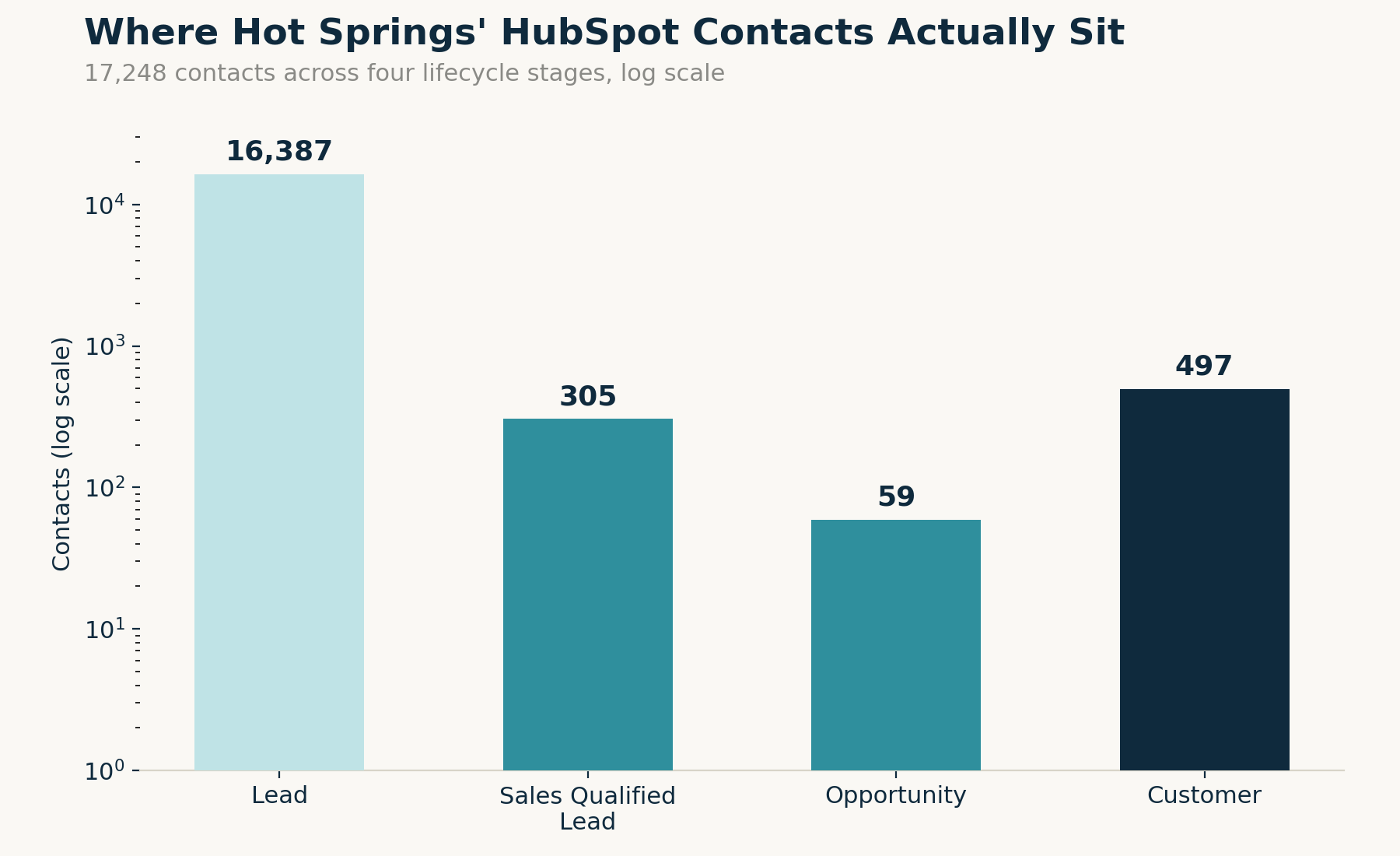
Of just over 17,000 contacts, 16,387 sit at Lead. Only 305 have been qualified into a Sales Qualified Lead, 59 are an active Opportunity, and 497 are Customers. The gap between Lead and everything past it is the point: most people who show up on a website don't become a sale, and a CRM that treats every one of them the same is a CRM that can't tell you anything useful.
Here's where it feeds back into paid media. HubSpot captures a Google Click ID (GCLID) on contacts who arrive through a Google Ads click, roughly 600 contacts currently carry one. When a contact tied to a GCLID moves into Sales Qualified Lead or Customer, that's a real signal we can feed back to Google as a conversion, not just a form fill. Google's Maximize Conversions bidding is only as smart as the conversion data it's optimizing against. Feed it every form fill and it'll happily spend your budget finding more people who fill out forms and never buy. Feed it actual qualified leads and customers, and the algorithm starts finding more of those instead.
Hot Springs contacts by lifecycle stage
Lead
16,387
Sales Qualified Lead
305
Opportunity
59
Customer
497
Of just over 17,000 contacts. The gap between Lead and everything past it is the point.
Pipelines and Deal Creation
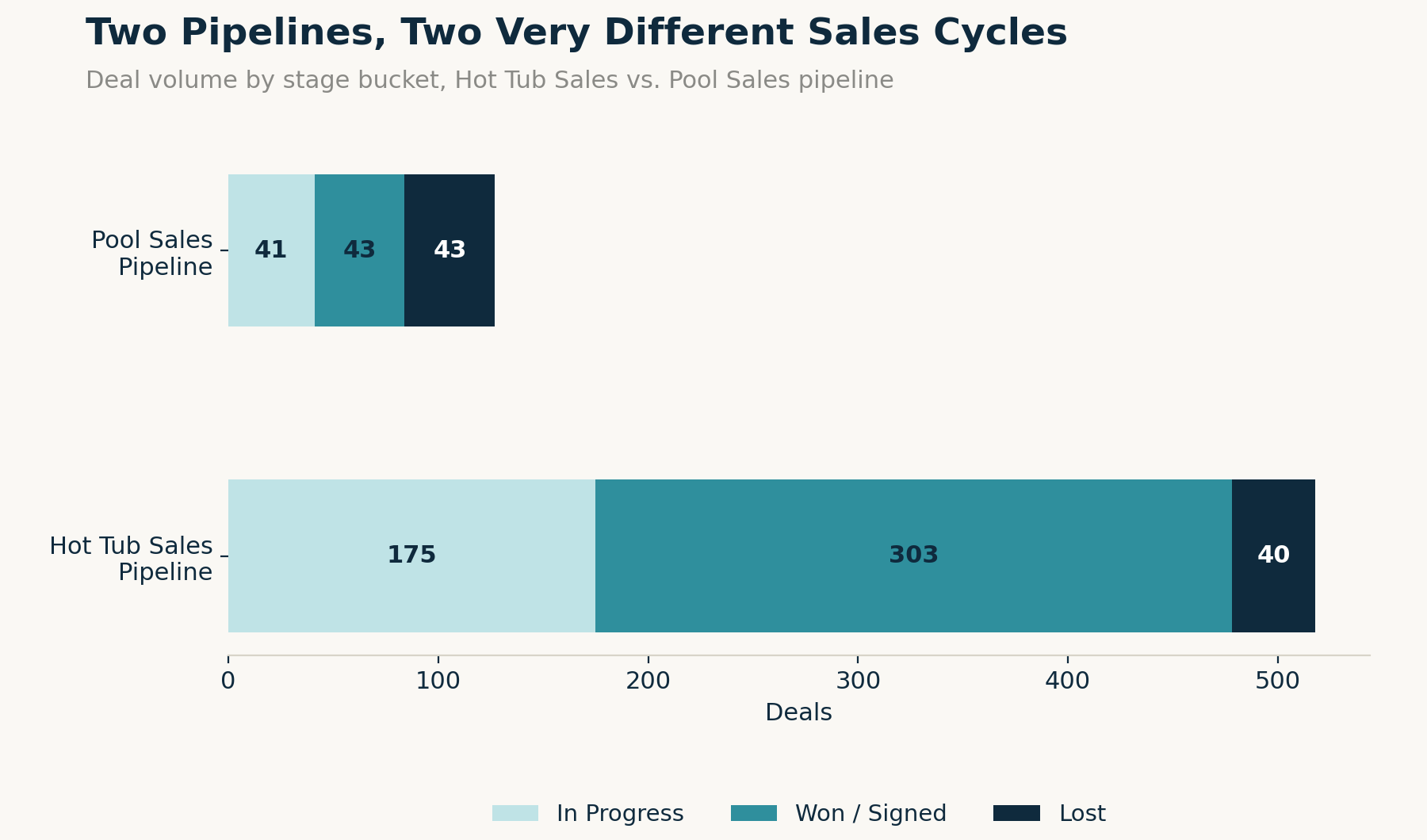
Hot Springs doesn't run one generic sales pipeline. It runs two: a Hot Tub Sales Pipeline and a separate Pool Sales pipeline, because those are two completely different sales processes. A hot tub is a walk-in-or-call, days-to-weeks decision. An in-ground pool is a design, contract, and months-long build. Forcing both through the same set of stages would make the data meaningless for either one.
Right now that's 518 deals moving through the Hot Tub Sales Pipeline, split across Lead, Contacted, Nurturing, Proposal, and Sale Pending stages before landing on Won or Lost, and 127 deals in the Pool Sales pipeline running its own version of the same idea. Deals aren't created by someone remembering to log them. They're created automatically when a lead reaches a specific point, a form fill, a qualified call, so the pipeline reflects what's actually happening instead of whatever the sales team had time to type in that day.
518deals in the Hot Tub Sales Pipeline
127deals in the Pool Sales pipeline
Lead Source: Every Channel Gets Its Own Line
Every marketing channel Hot Springs runs, organic search, Google Ads, Facebook, walk-ins, referrals, gets its own tracked line through CallRail, and that source gets written directly onto the HubSpot contact record.
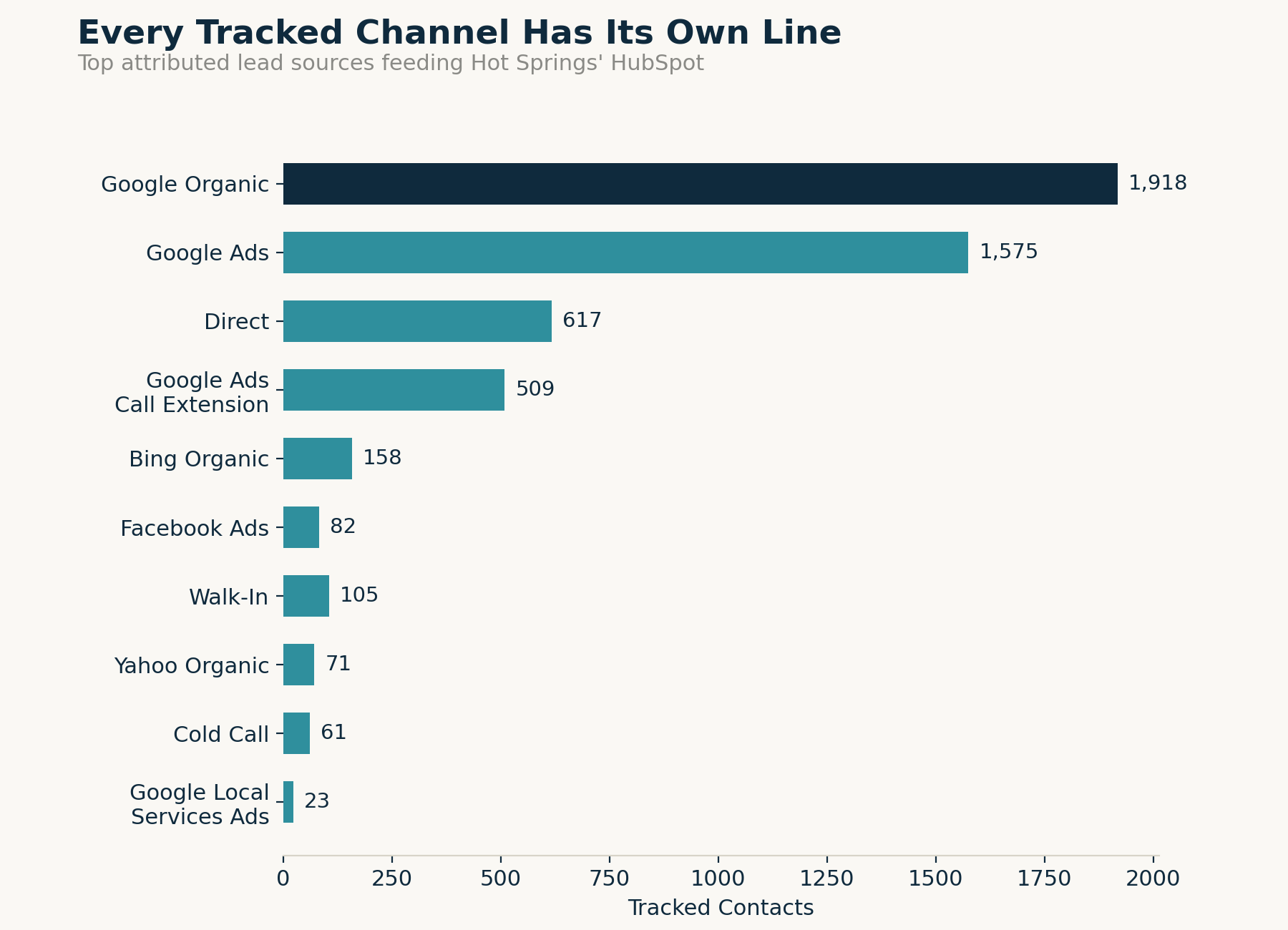
Google Organic and Google Ads are the two biggest tracked sources, 1,918 and 1,575 contacts respectively, with Direct, Google Ads Call Extension, Bing, and Facebook Ads filling in behind them. There's also a large chunk of older contacts with no clean source attached, mostly imported customer history from before this tracking setup existed. We don't hide that in the reporting. A CRM that pretends its historical data is cleaner than it is will eventually make a bad decision look like a good one.
Biggest tracked contact sources
Google Organic
1,918
Google Ads
1,575
Direct, Google Ads Call Extension, Bing and Facebook Ads fill in behind them.
Sales Team Dashboards
Every deal in both pipelines is assigned to a specific person on the sales team, not left in a shared queue for whoever gets to it first. Each rep works from a dashboard that shows exactly what's assigned to them: which leads are new, which deals are sitting in a stage too long, and what's actually closing. Nobody's guessing who's supposed to call a lead back. It's assigned, it's visible, and if it stalls, that shows up too.
Email Inbox Connection
Every team member's email inbox is connected directly into HubSpot. Right now that's over 2,300 logged email interactions between the sales team and leads, automatically attached to the right contact record with no one manually copying and pasting a conversation into a note. If a customer emails back three weeks later asking about their quote, whoever picks it up can see the entire conversation history instantly instead of starting from zero.
The CallRail Integration
Every tracked phone number routes through CallRail, and CallRail pushes that data straight into HubSpot: which number the caller dialed, the campaign it belonged to, a recording of the call, and a lead score. Over 2,500 contacts in the account currently have a tracked first call attached to their record.
That matters because phone calls are historically the hardest channel to attribute in marketing. Without this, a call is just a call, disconnected from whatever ad or search result actually drove it. With it, a phone call gets treated exactly like a form fill: sourced, timestamped, and tied to a specific contact and deal.
The Webflow Tracking Script That Creates Contacts Automatically
Hot Springs' website runs on Webflow, and the HubSpot tracking script sits on every page. When someone fills out a form on the site, a contact gets created in HubSpot automatically, no one on the team is manually entering that lead. Right now, form submissions account for over 4,000 contacts and the CallRail integration accounts for nearly 3,000 more, all created without a human touching a keyboard. The rest of the database is a mix of manually added records and historical customer data imported when the account was first built.
The tracking script is also what makes the lead source data possible in the first place. It's what recognizes which page a visitor landed on and which tracked number or link brought them there, before they've done anything else.
What This Actually Costs
We start every client on HubSpot's free CRM and free marketing tools and push those as far as they'll go. We only look at a paid Sales Hub or Marketing Hub plan once a client has genuinely outgrown the free tier. Answer the questions below to see where you stand, and if you've outgrown it, get a rough monthly range.
We start every client on HubSpot's free tools and push those as far as they'll go before recommending a paid plan. Check anything that's true for you:
Sales Hub triggers
Marketing Hub triggers
Sales Hub plan
Marketing Hub plan
Answer the questions above
Rough estimate based on HubSpot's published list pricing (as of Jan 2026). Actual invoices vary with negotiated discounts, bundled hubs, add-ons, and contact list growth — this is a planning range, not a quote.
Why does branded by set up HubSpot before running ads for a new client?
Because ad performance is only as trustworthy as the lead data behind it. Without a CRM tracking every deal and flagging spam or unqualified leads, you can't tell whether an ad budget increase is actually working or just generating more noise.
How does a CRM actually make Google Ads perform better?
By feeding real outcomes back into the platform. Google's automated bidding, like Maximize Conversions, optimizes toward whatever you tell it counts as a conversion. If that's just form fills, it'll find you more form fills. If it's leads that HubSpot shows actually turned into a sale, it optimizes toward that instead.
What happens when a lead calls instead of filling out a form?
It gets tracked the same way a form fill does. CallRail assigns a tracking number to each marketing channel, logs the call, and pushes that data into HubSpot, source, recording, and lead score included, so a phone call is never a dead end for attribution.
Does every website visitor automatically become a HubSpot contact?
No. A contact gets created when someone takes an action, submitting a form or making a tracked call, not just from visiting a page. The tracking script identifies the visit and the source; the contact record gets created once there's an actual lead behind it.
Do you have to pay for HubSpot from day one?
No. We start every client on HubSpot's free CRM and free marketing tools and only move to a paid Sales Hub or Marketing Hub plan once they've genuinely outgrown it, more people needing CRM access, more than one pipeline, real automation, or a marketing contact list and email volume that hits the free tier's limits.
The Bottom Line
None of this is complicated. It's a CRM that's actually maintained: pipelines that match how the business really sells, a tracking script and call integration that create contacts without anyone typing them in by hand, and lifecycle stages that feed real signal back into the ad platforms spending the budget. That's the difference between a HubSpot account that looks good in a demo and one that actually earns its cost every month.