There's a measurement problem hiding in most organic search dashboards right now: traffic appears to be fine, but something feels off. Rankings are holding. Impressions might even be growing. But clicks are down on queries that used to be reliable drivers. The site audit shows nothing broken.
The most likely explanation is AI Overviews. Google is answering more questions directly on the search results page, which means users are getting what they need without clicking through to anyone's website. The question is: which of your keywords are being affected, how much, and what should you do about it?
Google added a real AI report to Search Console in 2026. It helps, but it only tells half the story. Here's what it shows, what it still hides, and the framework that covers the rest.
Key takeaways
Search Console's Generative AI report reached every property by August 11, 2026, under Performance.
It shows impressions only: no clicks, no CTR, no queries.
The AI Overview signature: impressions or rankings hold while clicks and CTR fall on informational queries.
For informational content, optimizing for the citation position is more durable than fighting for the click.
What the New Generative AI Report Actually Shows
Google rolled out a real Generative AI report inside Search Console. It launched June 3, 2026, went to a UK test group first, then reached every property by August 11, 2026. Find it under Performance, in a new tab labeled Generative AI features (Beta).
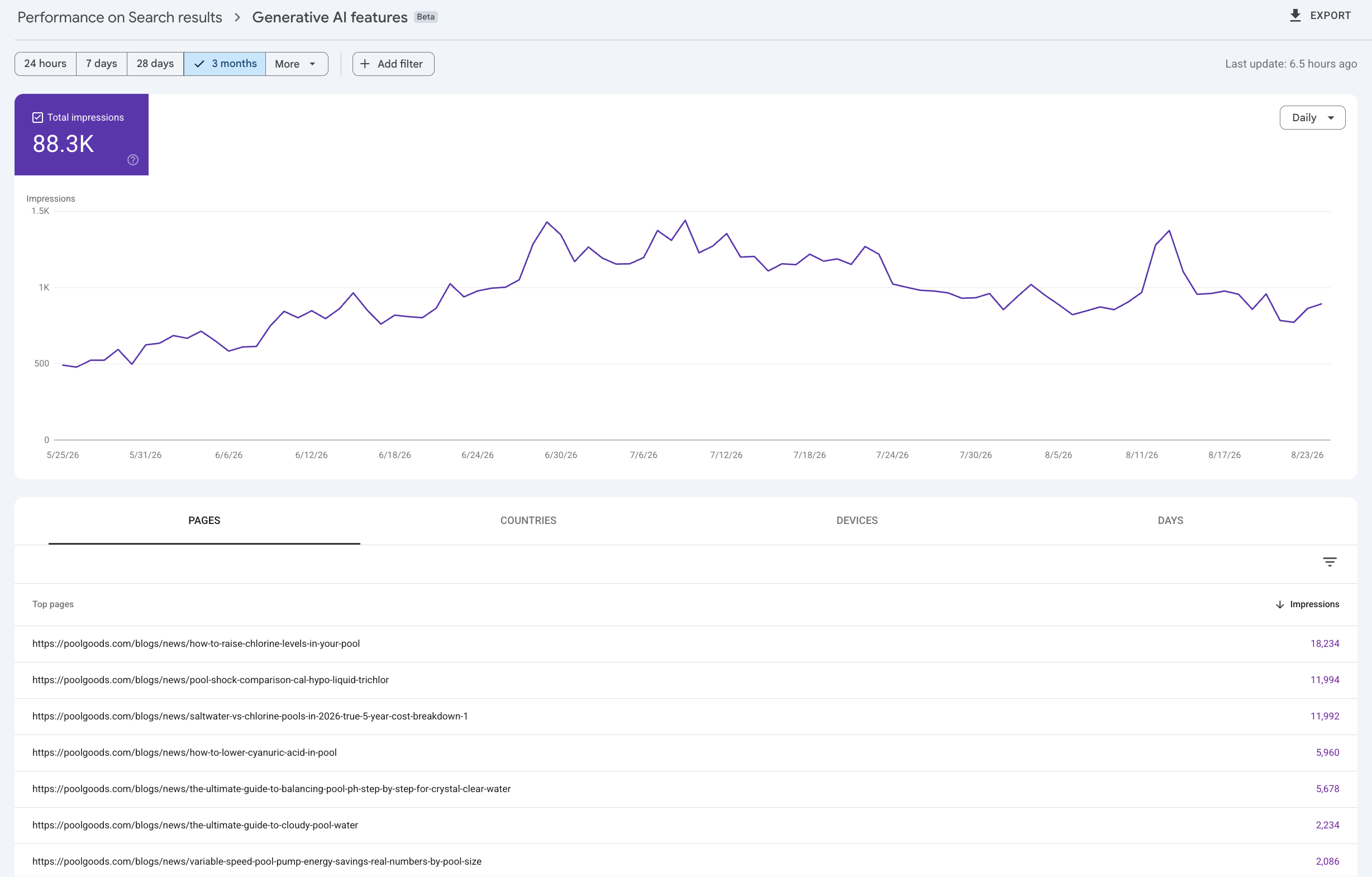
It shows impressions. That's it. You get counts broken out by page, country, device, and date, covering AI Overviews, AI Mode, and the generative results inside Discover. Here's what that looks like in a live account, 3 months of impression data with a same-day freshness indicator:
What it doesn't show is the part you actually need for decisions: no clicks, no CTR, no queries. You can see that AI surfaces are picking up a page. You still can't see which searches triggered it or whether anyone clicked through afterward. That's the gap the rest of this framework fills.
What the report shows
Impressions
Broken out by page, country, device and date
AI Overviews, AI Mode and generative results in Discover
What it still hides
Clicks
CTR
Which queries triggered the AI result
The Signal You're Looking For
AI Overviews leave a distinctive pattern in search data. When an AI Overview starts answering a query that your content previously captured, you'll typically see one of these three signatures:
Impressions hold steady or increase while clicks drop. The AI is showing users your content territory. The queries are still happening, but the AI is answering them before anyone needs to click.
CTR drops on informational queries while transactional queries remain stable. AI Overviews are much more common on "what is," "how to," and "why" questions than on high-intent commercial queries. If your informational content is taking a hit while your service pages aren't, this is almost certainly AI-driven.
Position holds but clicks drop. You're still ranking in the same place, but the AI Overview is above your result, capturing attention before users scroll to the blue links.
The Framework: A Three-Step Search Audit
Step 1: Segment your informational queries. Open Google Search Console and go to Performance. Click New, then Query, then Custom (Regex). Paste this filter: ^(who|what|where|when|why|how|is|can|does). This isolates queries beginning with question words, the category most affected by AI Overviews. Compare CTR for this segment over the last three months against the same period the previous year. A meaningful CTR drop without a corresponding ranking drop is your primary AI impact signal.
Step 2: Identify pages that might be citation sources. Look at your top blog posts and informational pages. If a page's traffic is holding steady or even growing despite ranking lower than before, you may be appearing as a cited source inside an AI Overview. That's actually a good sign. It means AI is using your content and sending some fraction of users through. The goal is to optimize further for this position, not abandon it.
Step 3: Monitor zero-click keyword patterns. Find your highest-impression informational keywords and check their CTR trend. A keyword sitting at position 1 with 15% CTR a year ago and 8% CTR today, with no ranking change, is almost certainly experiencing AI Overview impact. This keyword is worth restructuring for citation rather than click capture.
One keyword at position 1, no ranking change
CTR a year ago
15%
CTR today
8%
A drop like this with steady rankings is almost certainly AI Overview impact.
Restructuring Content for the Citation Position
Once you've identified which pieces of content are losing clicks to AI Overviews, you have a choice: try to recapture clicks through content that AI can't absorb, or optimize for the citation position itself.
For most informational content, the citation path is more realistic and more durable than fighting to win clicks back. AI systems tend to cite well-structured content from authoritative sources. Getting cited in an AI Overview generates fewer direct clicks than a number one ranking used to, but it still builds branded exposure, drives some direct traffic, and compounds into more citations down the line.
The restructuring checklist for citation optimization: add a direct answer to the implied question in the first paragraph (40–60 words, no preamble), convert section headings to question format, add a structured FAQ section at the bottom of the page addressing the questions people ask after the main topic, and implement FAQ Schema markup.
Content That AI Can't Absorb
Not all content should be optimized for AI citation. Some content types generate clicks that AI Overviews don't threaten, and understanding this distinction helps you allocate content investment correctly.
AI Overviews rarely appear for high-intent commercial queries. "Best CRM for small business" might trigger an AI Overview, but "Salesforce pricing 2026" generally doesn't. Google knows the user needs current, specific information that a generated answer might get wrong. Transactional and comparative content targeted at decision-stage buyers is largely protected from the AI Overview traffic impact.
Original research, proprietary data, and unique perspectives also tend to perform well in the click-capture model because AI systems cite these rather than reproduce them. A piece of content with original survey data becomes a reference point that AI mentions but can't replace. That drives users to click through to see the data themselves.
Setting Up an Ongoing Monitoring System
AI search impact isn't a one-time audit. It's an ongoing phenomenon that evolves as Google expands AI Overview coverage and as competitors optimize their content for the same citation positions you're targeting.
A monthly monitoring cadence covers the key signals without becoming overwhelming. Review your top-20 informational keywords for CTR trends. Track your branded search volume too. An increase in direct brand searches often correlates with AI Overview citation, since users who see your brand cited tend to search for you directly. Manually test your five most important informational queries in Google to see whether AI Overviews are present and whether your content is cited.
The pattern to watch for: steady increase in branded search, accompanied by decrease in clicks on informational queries where you rank, is the clearest possible signal that AI citations are replacing direct organic traffic for your brand. This is broadly positive but requires ongoing content investment to maintain the citation positions you've earned.
Common Questions About AI Search Reporting
Does Google Search Console show AI Overview clicks?
No. The new Generative AI report shows impressions only, broken out by page, country, device, and date. Clicks, CTR, and query data still aren't included. Use the three-step audit above to fill that gap.
Can I stop my content from showing up in AI Overviews?
Google added a domain-level toggle that lets you exclude your site from AI Overviews, AI Mode, and Discover's generative features without opting out of regular search. Page-level controls are planned for March 2027. This is separate from the Google-Extended robots.txt token, which only blocks AI training, not AI Overviews surfacing your content, and it doesn't cover the Gemini app.
Is the new report available on every site?
Yes. It rolled out to a UK test group first, then reached every Search Console property by August 11, 2026. If you don't see it yet, check under Performance for the Generative AI features (Beta) tab.
Search Console shows the clicks. For the recommendations themselves, the free AI recommendation check runs the questions your customers ask ChatGPT and sends you a report.
The Opportunity in the Data
AI search impact in Google Search Console is not just a problem to manage. It's an opportunity to spot. The brands that adapt their measurement and content strategy to this environment before their competitors do will accumulate citation authority that is genuinely difficult for late movers to replicate.
Citation authority compounds in ways that traditional link authority doesn't. A brand that's cited frequently in AI Overviews for questions in its category becomes the default reference for those questions. The AI systems learn that association and reinforce it in future training cycles. Getting cited early in your category is a long-term competitive advantage in the AI search landscape.